New Campaign Monitor single team accounts created from 3rd August, 2026 will be utilizing our latest billing system, powered by Chargebee. If your account was created on or after this date, some information in this article may not apply to you — see Chargebee monthly billing for the current billing article.
Monthly billing is the most cost effective option if you send frequently, especially the Essentials and Premier plans, which offer unlimited sending for campaign and journey emails.
When you select a monthly plan, the price shown is based on *total* number of active subscribers within your account’s Lists & Subscribers tab. Our system looks at that count at the time of sending a campaign / Journey and on your account's billing date. Duplicate subscribers across multiple lists will contribute to this total.
In this article we'll explain:
- How the monthly rate is calculated.
- When you will be billed.
- Early tier upgrades.
- Monthly send limits and temporary waivers.
How the monthly rate is calculated
When you select a monthly plan, the price shown is based on how many subscribers you have at the time. If, for example, you've imported 430 subscribers, that will put you in the first pricing tier of 0-500 subscribers. The price will change as more subscribers are added, or if you exceed email send limits.
Tiers for the first 50,000 subscribers are shown below. Prices aren't shown because we offer payment in multiple currencies. To view prices for your region, look in your account, or view our pricing page.
| Subscribers | Email send limits |
| | Lite plan* | Essentials and Premier plans |
| 0–500 | 2,500 | Unlimited
inc. 5,000 transactional |
| 501–2,500 | 12,500 | Unlimited
inc. 25,000 transactional |
| 2,501–5,000 | 25,000 | Unlimited
inc. 50,000 transactional |
| 5,001–10,000 | 50,000 | Unlimited
inc. 100,000 transactional |
| 10,001–15,000 | 75,000 | Unlimited
inc. 150,000 transactional |
| 15,001–25,000 | 125,000 | Unlimited
inc. 250,000 transactional |
| 25,001–50,000 | 250,000 | Unlimited
inc. 500,000 transactional |
*The Lite plan send limit includes all email types. Essentials and Premier plans have unlimited sends for campaigns, journeys, and RSS emails, however transactional emails have their own limit on these plans.
Your monthly bill is determined by the number of subscribers you have at the time your bill is due. For example, if you have five lists with 8,000 active subscribers on each list, your bill will be calculated based on a total of 40,000 subscribers (8,000 subscribers x 5 lists = 40,000). This would put you in the pricing tier of 25,001-50,000 subscribers.
Which subscribers count
Subscribers with a status of unsubscribed, bounced, unconfirmed or deleted — as well as those on the suppression list — are not counted toward the total for billing.
However, if the same email address is active on multiple lists, it counts multiple times against the total. To avoid active subscriber duplication, use segments to create sub-lists instead of having separate lists for different audiences, or campaign sends.
View the current subscriber total
To see how many subscribers you have, open the Lists & subscribers section, then look at the number under "Total subscribers". This is the total number of subscribers across all lists.
View the monthly rate in your account
To look up your current monthly rate, or see the price for the next tier:
- Click your profile image at the top right, then select Billing.
- Click View or change your plan.
- On the "Choose a plan" page you'll see the current plan you are on, and your monthly rate. To see how costs will scale as sending increases, click See all tiers below any of the three monthly plans.
When you will be billed
When you select a monthly plan , the first monthly amount is charged immediately. From that date and time onward charges recur monthly, billed to the credit card supplied.
Billing periods renew at the same time every month. So, if the charge for the first monthly bill is at 2:38pm, every monthly bill that follows will be charged at the same time. To see what time the next billing period starts, check when the last invoice notification email was received.
If a billing period is activated on the 31st, the charge will be taken on the last day of the month for months with less than 31 days. It reverts to the 31st for subsequent charges.
While monthly bills are always charged at the same time, you may be billed at other times for events such as early tier upgrades, when monthly send limits are exceeded, or to pay for design and spam tests (only on the Lite plan).
Early tier upgrades
An early upgrade is one that takes place before the new billing month starts. When your subscriber total exceeds the limit for the current pricing tier, we automatically upgrade the plan to a higher tier at the start of the next billing period.
However, if you need to send a campaign, turn on a journey, or start an RSS campaign before the new billing month starts, there's an option to pay the difference between the current pricing tier and the higher level tier. The alternative to paying for the early upgrade is to wait for the monthly plan renewal date.
Note that any automated emails sent when total subscriber count is over-limit will cause an automatic tier increase and resulting payment. This includes scheduled campaigns, RSS campaigns, active Journeys and Transactional emails.
To understand how early upgrades work, let's take a look at the billing history of a company named DesignCo. Note that they're being billed in US dollars, and the prices referenced exclude taxes.
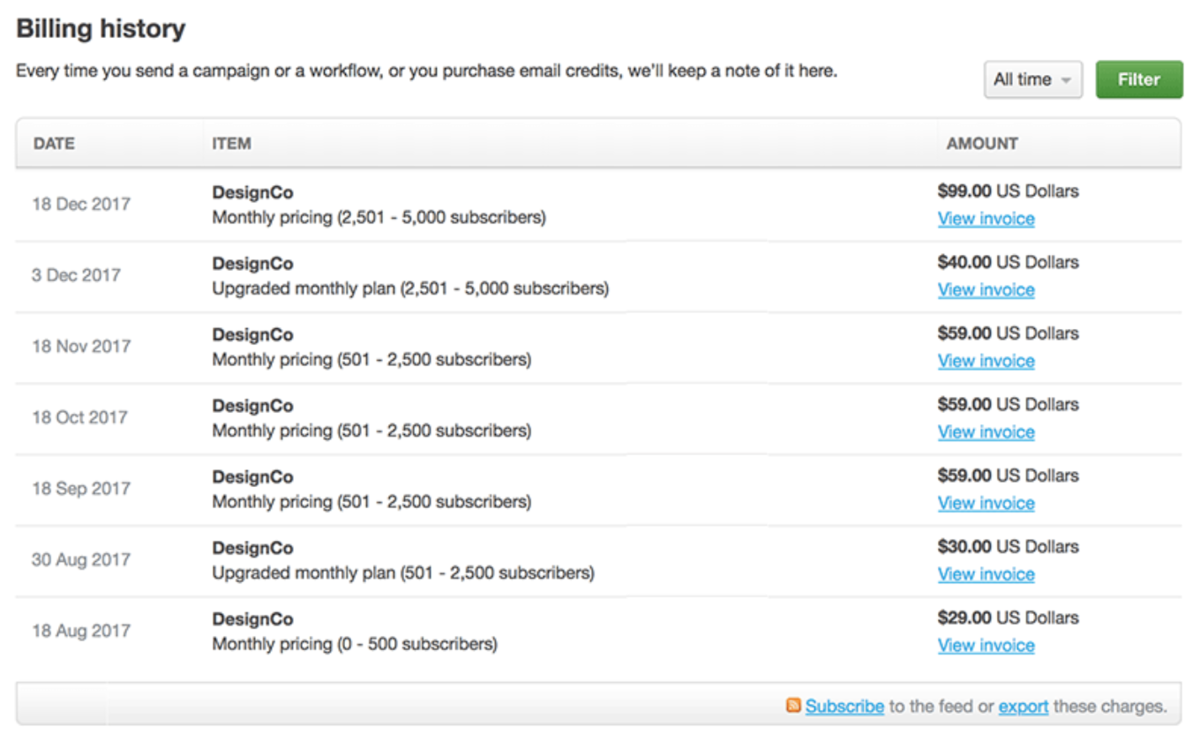
- DesignCo opens their account on 18 August, 2017. Their new account starts at the 0-500 subscribers tier, which costs them USD$29 a month. Because they signed up on the 18th, the 18th of each month will be DesignCo's regular billing day.
- On 30 August, they need to send an email, but their audience has grown to 501-2,500 subscribers, putting them in a higher tier. Instead of waiting until their new billing month to be upgraded to the higher tier so they can send again, they choose to upgrade early to send the email now. They are charged USD$30, the difference between the old and new tiers.
- On 18 September, they are billed at their new monthly rate of USD$59, for 501-2,500 subscribers. They continue paying that rate until 3 Dec, where they choose to upgrade early again.
Account users with limited access don't have access to billing features. As a result, early upgrades and temporary waivers (explained below) happen automatically for these users, so they aren't prevented from sending. When this happens, the account owner will be billed the difference between the two tiers.
Monthly send limits and temporary waivers
Customers on the Lite plan, or who send transactional emails on the Essentials or Premier plan, need to know about send limits — that is, the number of emails that can be sent each month. Check the table above to see what the send limits are for each tier.
Here's how send limits work for each of the monthly plans:
- Essentials and Premier plans — Include unlimited sending for campaigns, journeys, and RSS emails, but transactional emails have a monthly send limit.
- Lite plan — All email types (as mentioned above) count toward the monthly send limit.
What happens when you reach the send limit depends on the monthly plan, and the type of email being sent.
Lite plan
If you reach the monthly send limit for your tier on the Lite plan, and you need to send more emails in that billing month, you will be presented with two options when trying to send:
- Pay for a temporary waiver — Pay the difference between the current pricing tier and the higher tier to continue sending. When the next billing month starts, the number of monthly email sends will be reset, and the monthly rate will return to a pricing tier based on the total number of subscribers.
- Upgrade to the Essentials plan — Switch to the Essentials plan by paying the difference between the current tier on Lite and the equivalent tier on Essentials.
Scheduled campaigns and transactional email
Scheduled campaigns and transactional emails will send even if you have reached the send limit. This is because they are treated as time-sensitive emails that must go out at a particular time.
If they cause you to exceed the send limit, you'll be granted a temporary waiver and moved up a pricing tier without being prompted, which means being charged the difference between the two tiers.
When the next billing month starts, the number of monthly email sends will be reset, and you'll return to a pricing tier based on the total number of subscribers.
Frequently asked questions
Below are some answers to questions we're commonly asked about monthly billing. If you have a question we haven't addressed please contact us.
Do I have to pay by credit card?
Yes, for monthly billing plans we only accept payment by credit card. The only other option is to choose pay per campaign billing because this can be paid for with email credits, and email credits can be purchased in bulk without a credit card.
What is the minimum monthly contract term?
There is no minimum contract period for paid plans. For monthly billing your only commitment is for the current month purchased. You are free to close your account at any time or, to keep your account active but stop monthly payments, see the following answer.
How do I cancel monthly billing?
If you want to take a break from sending you can stop monthly payments and still keep your account active. To do this, just switch from monthly billing to pay per campaign billing. You can switch back again later if you want to.
The change in billing will take effect at the start of your next billing cycle.
What happens if a credit card is declined?
If you are paying a monthly charge and your card is declined we'll send you a notification email. As soon as you update your card details we'll take the payment and the affected account will be able to send campaigns.
During the period that a credit card payment has failed and updated details are pending, you will not be able to send any emails. If you are running journeys, they will also be paused — unless there are leftover email credits in your account to continue sending them.
As soon as payment details are updated everything will be back to normal, and paused journeys will be restarted automatically. In cases where the payment problem is temporary and your credit card details are correct, we will keep trying to process the payment a few times over.
What happens when the send limit is exceeded on a Lite monthly plan?
You will be presented with two options:
- Increase your monthly sending limit by paying the difference between the current pricing tier and the higher tier. On your next billing cycle, your sending limit will return to what it was and you'll be charged your normal monthly fee.
- Upgrade to an Essentials or Premier monthly plan, paying the difference between the current and new plan immediately. You will start paying the new amount for the Essentials or Premier plan the following month.
What happens if I import more subscribers than I'm paying for?
You will be moved to a higher pricing tier and charged the new rate at the start of the next billing period. Or, if a campaign is sent or scheduled before the next billing period, you will be charged the difference between your current pricing tier and the higher level tier.
If this happens, you'll see a payment increase notification in your account when you next try to send a campaign. The notification will state the amount owing to cover the difference from one tier to the next.
Can I prevent my plan from moving to a higher pricing tier?
No, because moving between tiers is done automatically based on how many active subscribers you have and your plan's email send limit. Send limits apply to Lite plans only.
If you're on a Lite plan, keep an eye on your send history — if it's looking like you're repeatedly hitting the send limit, consider switching to an Essentials or Premier plan.
Can I be invoiced in a different currency?
Yes, if the currency that has been set for your account is incorrect, you can switch currencies. Campaign Monitor supports six currencies for account billing.
Can I switch between monthly plans?
You can switch between Lite, Essentials and Premier at any time:
- Click your profile image at the top right, then select Billing.
- Click View or change your plan.
Upgrading a plan requires the difference between the two plans to be paid on the spot. After that, the upgraded plan kicks in immediately.
If the switch is from Premier to Essentials, or Essentials to Lite, you will stay on the higher plan for the remainder of the billing period. The lower plan starts from the next billing period.
If I downgrade from the Premier plan, can I still contact phone support?
Premier plan phone support will not be available if you downgrade to the monthly Essentials or Lite plans.