New Campaign Monitor single team accounts created from 3rd August, 2026 will be utilizing our latest billing system, powered by Chargebee. If your account was created on or after this date, some information in this article may not apply to you — see Chargebee monthly billing for the current billing article.
We send a tax invoice to your account email address for every transaction made. Additionally, a copy of every invoice is archived in your account.
Find your invoices
Permission required to use this feature: full access
To see a full history of your purchase transactions, click your profile image at the top right, select Billing, then click Billing history.
In the list of billing transactions you'll see View invoice links below each invoice amount. Click these to open the invoice in a new browser window.
To print an invoice, click View invoice then use your web browser's File > Print function.
Find a specific invoice
Use the filtering tool above your list of billing transactions to sort by time frame.
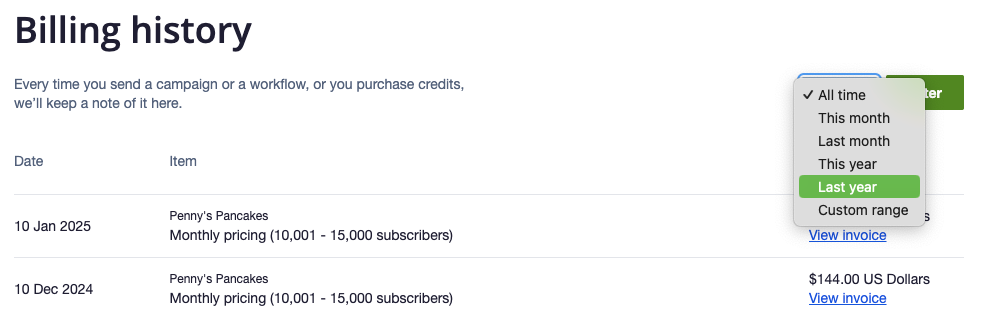
Click All time to select either a preset or custom time frame, then click Filter to show the results.
Check where invoices are being sent
Permission required to use this feature: full access
Invoices are emailed to your account email address. If more than one person has access to your account, invoices are sent to the nominated email address, known as the "primary contact".
To check who the primary contact is:
- Click your profile image at the top right, then select Manage team (if you can't see "Manage team", you do not have full access and will need to contact your administrator).
- The primary contact is identified by an email icon next to their name.
You can only have one primary contact, but you do have the option to change who it is.